Author: Admin

  • How to Retrieve Email Address Used on JAMB Profile

    How to Retrieve Email Address Used on JAMB Profile

    This guide will walk you through the process on How to Retrieve Email Address Used on JAMB Profile, ensuring that you regain access to your profile seamlessly.

    Losing access to the email address linked to your JAMB profile can be frustrating, especially when you need it for logging in, checking results, or making corrections. Thankfully, there are straightforward steps to retrieve the email address you used during registration.


    Why is the Email Address on Your JAMB Profile Important?

    The email address linked to your JAMB profile serves as your gateway to essential services on the JAMB portal. It is where notifications, login credentials, and updates are sent. Without it, you may face challenges accessing your profile, printing your admission letter, or completing change of institution/course processes.


    Steps to Retrieve Email Address Used on JAMB Profile

    Here’s a step-by-step guide to help you recover your JAMB-linked email address:


    1. Check Your JAMB Slip or Printout

    The first place to look for your email address is your JAMB registration slip. During registration, you were provided with a printout containing key details, including the email address linked to your profile. Review this document carefully.

    • Action: Locate the printout, which is often labeled “Candidate’s Slip.”
    • Outcome: If your email is visible, you can proceed to log in or recover it directly through the email provider.

    2. Visit the JAMB Portal

    If your email isn’t on the registration slip or you’ve misplaced it, visit the official JAMB portal

    1. Go to the JAMB e-Facility page.
    2. Enter your JAMB registration number or phone number.
    3. Click on the “Forgot Email” option (if available).

    JAMB may display your registered email address on the portal for you to note down.


    3. Contact JAMB Support

    If you are unable to retrieve your email through the steps above, contacting JAMB support is a reliable solution. Here’s how:

    • Action:
      • Visit the official JAMB support page or office.
      • Provide your JAMB registration number and any other requested details, such as your full name and year of registration.
      • Request for assistance in retrieving the email address linked to your profile.
    • Outcome: The support team will verify your information and provide you with the registered email address.

    4. Check with Your Email Provider

    If you have multiple email accounts and are unsure which one you used, you can attempt recovery through your email providers. Most email services have a search feature that allows you to find emails related to “JAMB” or “e-Facility.”

    • Action: Search for keywords like “JAMB,” “UTME,” or “e-Facility” in your inbox. This may help you locate emails sent from JAMB during registration.
    • Outcome: Identifying the correct email account will allow you to access your profile.

    5. Visit the JAMB CBT Center

    If online methods fail, you may need to visit the JAMB-accredited CBT center where you registered. These centers often keep records of candidate registration details.

    • Action:
      • Go to the CBT center with a valid form of identification.
      • Request for help in retrieving your email address.
    • Outcome: After verifying your identity, the center staff may assist you in recovering your email address.

    6. Use the JAMB SMS Service

    JAMB provides an SMS service that allows candidates to retrieve their email addresses. Follow these steps:

    1. Use the phone number you registered with during JAMB registration.
    2. Send a message in the format: RESEND EMAIL [JAMB Registration Number] to 55019 or 66019.
    3. Wait for a response from JAMB.
    • Outcome: You’ll receive an SMS containing the email address linked to your profile.

    7. Update Your Email Address (If Necessary)

    If you are unable to recover access to the email address, you may need to update it by following JAMB’s procedure for correcting profile details:

    • Action:
      • Log in to the JAMB portal using your registration number and existing password.
      • Navigate to the “Correction of Data” section.
      • Select “Change Email Address” and follow the prompts.
    • Outcome: You can link a new email address to your JAMB profile for future use.

    Preventing Future Issues

    1. Keep Records: Always save your registration details, including your email address, in multiple locations.
    2. Secure Your Email Account: Use a strong password and enable two-factor authentication to prevent unauthorized access.
    3. Backup Email Accounts: Link your JAMB email to a backup account for easy recovery in case of loss.

    FAQs

    1. Can I retrieve my JAMB email address without a phone number?
    Yes, by visiting the JAMB office or your registration center, you can recover your email without your phone number. Ensure you provide valid identification and other registration details.

    2. Is there a fee for retrieving my email address?
    While JAMB may not charge a fee for retrieving your email, there might be charges for SMS services or corrections on your profile.

    3. What if I can’t access my email account?
    If your email account is inaccessible, you may need to contact your email provider for recovery or request JAMB to update your email address.

    4. Can I change my JAMB email address?
    Yes, you can update your JAMB email address through the correction of data process on the JAMB portal.


    Conclusion

    Retrieving the email address used on your JAMB profile is crucial for managing your account and accessing key services. Whether you check your registration slip, use the SMS service, or contact JAMB support, there are multiple ways to recover your email. Always keep your registration details secure and ensure that your email account remains active and accessible to avoid similar issues in the future. however you can follow 9jaSchool for more updates.
  • How to Retrieve WAEC Exam Number Online

    How to Retrieve WAEC Exam Number Online

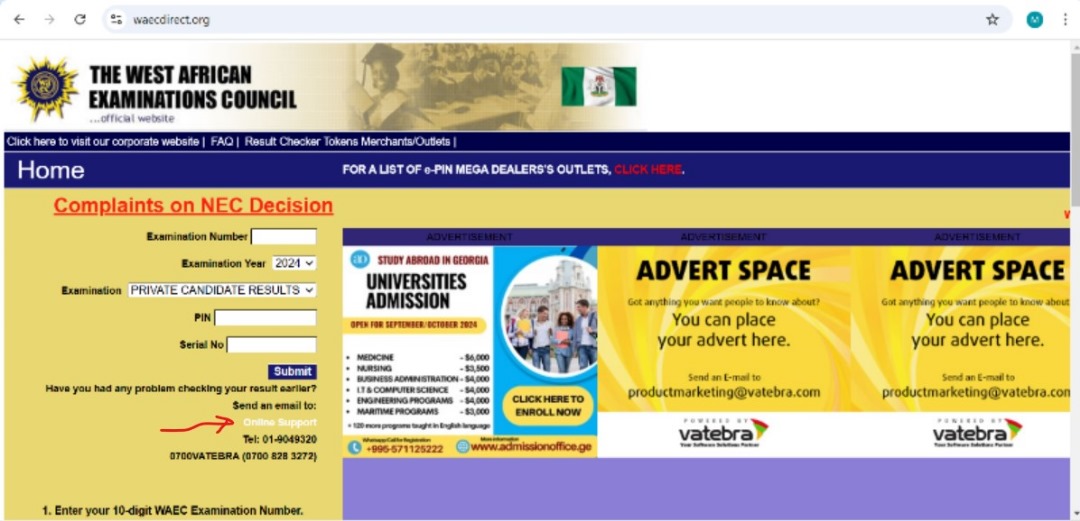
    guide on How to Retrieve WAEC Exam Number Online, because Losing your WAEC (West African Examinations Council) exam number can be stressful, especially when you need it for university applications, job requirements, or other important purposes. Fortunately, WAEC has made it possible for candidates to retrieve their exam numbers online. This guide will walk you through the step-by-step process of recovering your WAEC exam number seamlessly.


    What is a WAEC Exam Number?

    A WAEC exam number is a unique identifier assigned to every candidate sitting for the WAEC exams. It comprises ten digits: a center number (the first seven digits) and a candidate number (the last three digits). This number is crucial for accessing your WAEC results and serves as proof of participation in the examination.


    Why You Might Need to Retrieve Your WAEC Exam Number

    The WAEC exam number is often required for several purposes, including:

    1. University or College Applications: Institutions often request your WAEC exam details as part of the admission process.
    2. Employment: Employers may verify your academic qualifications by checking your WAEC results.
    3. Duplicate Certificates: Retrieving your exam number is essential if you need to apply for a replacement certificate.
    4. Further Studies Abroad: Foreign institutions may need your WAEC details for verification.

    If you’ve misplaced this number, retrieving it is essential to avoid delays or complications.


    Step-by-Step Guide to Retrieve Your WAEC Exam Number Online

    1. Visit the WAEC Official Website
      Go to the official WAEC website and Ensure you’re on the correct site to avoid scams.
    2. Navigate to the Candidate Support Section
      Look for the “Support” or “Help” section on the website. This is where you’ll find resources for retrieving your exam number.
    3. Provide Required Details
      To retrieve your exam number, you’ll need to supply the following information:

      • Full name (as used during registration)
      • Examination year (e.g., 2023)
      • Examination type (e.g., May/June or Nov/Dec)
      • Name of the school or center where you sat for the exam
    4. Use the Online Retrieval Form
      Fill out the online retrieval form provided on the WAEC website.
    5. Pay the Retrieval Fee (if applicable)
      WAEC may charge a small fee for this service. Payments can usually be made online via debit/credit cards or other digital payment methods.
    6. Receive Your Exam Number
      Once your details are verified, your WAEC exam number will be sent to your email address or displayed on the screen. Be sure to save or note it down securely.

    Alternative Methods to Retrieve WAEC Exam Number

    If you encounter challenges using the online method, you can explore these alternatives:

    1. Contact Your School or Examination Center
      Your school or exam center will have a record of your exam number. Reach out to them and provide your name and examination year.
    2. Visit a WAEC Office
      You can visit any WAEC office with a valid form of identification and request assistance in retrieving your exam number.
    3. Call WAEC Customer Support
      WAEC has dedicated support lines for candidates. Provide the necessary details, and they’ll assist you in retrieving your exam number.

    Tips to Prevent Losing Your WAEC Exam Number

    • Save Your Exam Slip: Keep a printed and digital copy of your registration slip.
    • Store in the Cloud: Save the number in cloud storage services like Google Drive or Dropbox for easy access.
    • Write It Down: Note it in a secure journal or notepad.
    • Use Reminder Apps: Apps like Evernote can help you store such details safely.

    FAQs

    1. Can I retrieve my WAEC exam number if I forgot the year I wrote the exam?

    Yes, you can. However, you must provide other accurate details, such as your full name and examination center, to narrow down the search.

    2. Is there a fee for retrieving my WAEC exam number?

    WAEC may charge a small administrative fee for the retrieval process, especially if done online. The fee varies by region.

    3. How long does it take to retrieve my WAEC exam number online?

    The process is usually instant if your details are correctly provided. However, delays may occur if manual verification is required.

    4. Can I retrieve my WAEC exam number without visiting the WAEC office?

    Yes, the online retrieval process eliminates the need to visit a physical office. However, you can still opt for an in-person visit if online attempts are unsuccessful.


    Conclusion

    Retrieving your WAEC exam number online is a straightforward process that ensures you can access your academic records when needed. By following the steps outlined above, you can quickly recover your exam number and avoid unnecessary delays. Remember to keep your details safe in the future to prevent similar issues.

    With this guide, you now have all the information needed to retrieve your WAEC exam number easily and securely. If you encounter any challenges, don’t hesitate to contact waec’s support team for assistance or follow 9jaschool for more updates.

  • How to Get Your Original WAEC Certificate

    How to Get Your Original WAEC Certificate

    simple guide on How to Get Your Original WAEC Certificate, including the process, requirements, solutions for lost certificates, and common issues.

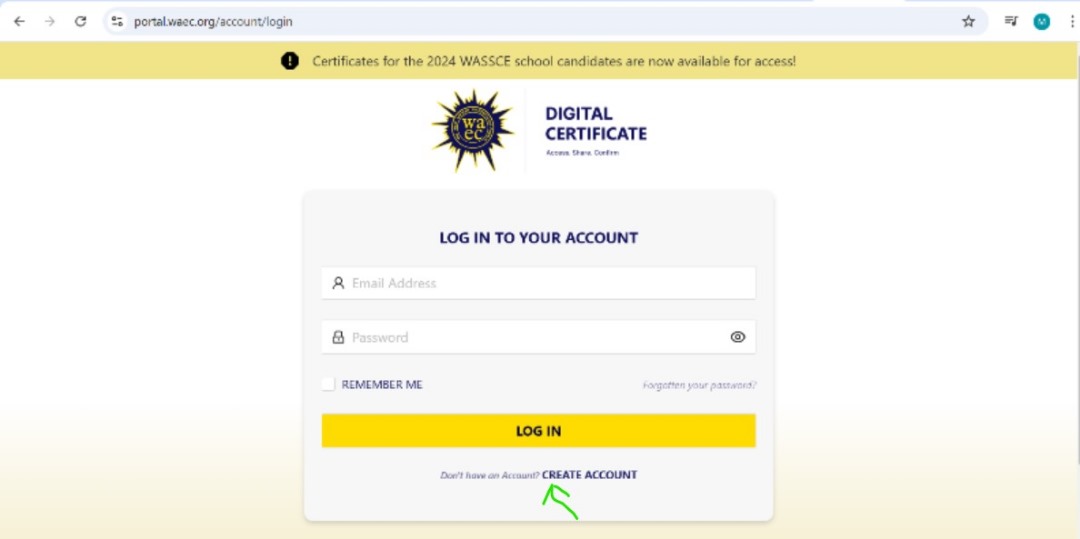
    The West African Examinations Council (WAEC) certificate is a crucial document for students who have completed their secondary school education in West Africa. Whether you need it for university admission, employment, or further studies, having your original WAEC certificate is essential. This guide will walk you through the steps to retrieve your certificate from the portal, and the requirements, and solutions to common issues.

    What is the WAEC Certificate?

    The WAEC certificate is an official document issued to students who have successfully completed and passed the West African Senior School Certificate Examination (WASSCE). It serves as proof of your academic achievements and is recognized globally.

    Why Do You Need the Original WAEC Certificate?

    • University Admission: Required for higher education institutions.
    • Employment: Employers often request it to verify your qualifications.
    • Travel and Immigration: Some countries require it as part of their visa application process.

    Types of WAEC Certificates

    There are two primary categories of WAEC certificates:

    1. Original Certificate: The permanent and official document issued by WAEC.
    2. Statement of Results: A temporary document issued by schools or WAEC while waiting for the original certificate.

    Steps to Obtain Your Original WAEC Certificate

    1. Collecting Your WAEC Certificate from Your School

    • Eligibility: If you took the WAEC examination as a school candidate, your certificate will be sent to your school.
    • Steps:
      1. Visit your school’s administration office.
      2. Present a valid form of identification (e.g., a school ID or national ID).
      3. Pay any collection fee if required by your school.
      4. Sign the collection register to confirm receipt of your certificate.

    2. Retrieving Your WAEC Certificate from a WAEC Office

    If you were a private candidate or your school no longer holds the certificate:

    • Visit the nearest WAEC office in your region.
    • Submit the following:
      • Exam registration details (e.g., year, exam number, and center).
      • A valid ID card (national ID, driver’s license, or passport).
      • Application letter requesting the certificate.
    • Pay the prescribed fee for certificate retrieval.
    • Collect the certificate after processing, which typically takes a few hours to a few days.

    What to Do If You Lose Your WAEC Certificate

    If your WAEC certificate is lost or destroyed, WAEC does not reissue the original certificate but provides an Attestation of Results or a Statement of Results. To obtain these:

    1. Visit the nearest WAEC office.
    2. Provide your exam details and a police report (for lost certificates).
    3. Submit an affidavit of loss from a court of law.
    4. Pay the required processing fee.

    WAEC Office Locations

    WAEC offices are spread across West African countries. Major offices in Nigeria include:

    • Lagos (Headquarters): Plot 6, Lateef Jakande Road, Agidingbi, Ikeja.
    • Abuja: WAEC Zonal Office, Wuse Zone 5.
    • Port Harcourt: WAEC Zonal Office, Aba Road.

    You can find a full list of WAEC offices on their official website.

    Common Issues and Solutions

    • Misspelled Names: Submit an application for correction at a WAEC office with supporting documents such as your birth certificate.
    • Damaged Certificate: Request an Attestation of Results to replace a torn or damaged certificate.
    • Unclaimed Certificates: WAEC keeps unclaimed certificates for several years, so visit their office if your school no longer holds it.

    Frequently Asked Questions (FAQs)

    Q: How long does it take to get my WAEC certificate? A: Certificates are typically available within a few months after the release of results. If collecting from WAEC, processing may take 1-3 days.

    Q: How much does it cost to retrieve a WAEC certificate? A: The cost varies depending on your region and the WAEC office. Fees typically range from 3,000 to 10,000 Naira in Nigeria.

    Q: Can someone else collect my WAEC certificate on my behalf? A: Yes, with a letter of authorization, a copy of your ID, and the representative’s ID.

    Conclusion

    Obtaining your original WAEC certificate is a straightforward process if you have the necessary documents and follow the proper steps. Whether it’s for academic, professional, or personal purposes, ensure you secure this vital document early to avoid delays in achieving your goals.

    follow 9jaschool for more updates